Introduction
Most employees have no clear idea what their benefits package is actually worth. They receive a stack of plan documents at onboarding, pick their coverage under deadline pressure, and promptly forget the details — until something goes wrong.
That gap is expensive for employers. According to the 2024 Aflac Workforces Report, 51% of U.S. employees don't fully understand their benefits coverage, and 71% want more information than they're currently receiving. Meanwhile, 57% of employers only communicate about benefits in the weeks before open enrollment.
An employee benefits summary directly addresses this. It translates complex plan documents into a clear, one-to-two-page overview employees can actually use. Creating the document is only half the job. Knowing when and how to use it determines whether employees actually read it.
This guide covers what to include, how to structure it, and how to deploy the same core document at every stage of the employee lifecycle.
Key Takeaways
- A benefits summary is a plain-language communication tool — not a legal document like an SPD or SBC
- Complete summaries cover health insurance, retirement, PTO, disability, life insurance, and voluntary benefits
- One core document, adapted for three moments: recruiting, onboarding, and open enrollment
- Five fields need annual review before every open enrollment cycle
- A benefits summary lists what employees have; a total compensation report shows what each benefit is worth in dollars — both serve distinct purposes
What Is an Employee Benefits Summary?
An employee benefits summary is a concise, plain-language document — typically one to two pages — that gives employees a fast, readable overview of their benefits package. It's written for the employee, not for compliance.
That distinction is worth spelling out. Two legally required documents already exist for compliance purposes:
- Summary of Benefits and Coverage (SBC): A standardized health-plan comparison document required under the ACA, produced in a federal template with regulated terminology
- Summary Plan Description (SPD): A broader ERISA-required disclosure covering plan operation, participant rights, claims procedures, and benefits (generally due within 90 days of a participant becoming covered)
Neither document is designed to help an employee quickly understand what they have. Both exist for legal disclosure. An employer-created benefits summary bridges that gap — translating legal disclosure into something employees can actually read and use.
Who Uses It and When
Three audiences benefit most from a well-designed summary:
- Prospective candidates evaluating a job offer who need to compare packages without reading 40-page plan documents
- New hires making enrollment decisions under a deadline during a high-information-load period
- Current employees during open enrollment or after a qualifying life event (marriage, new dependent, job change)
The Missing Piece: Dollar Value
One limitation that most benefits summaries share: they tell employees what they have access to, but not what it's worth. A summary might list "401(k) with employer match" without conveying that the employer contribution adds $3,000 to $5,000 per year in real compensation value.
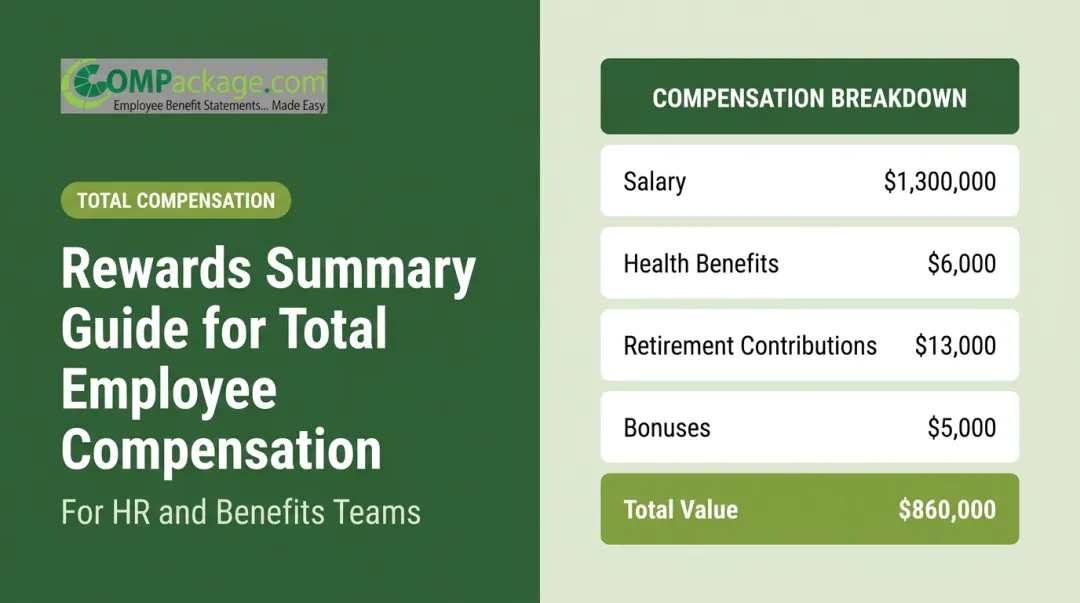
That gap is where a total compensation report comes in. A tool like COMPackage shows employees the dollar value of everything the employer pays — base salary, benefit contributions, retirement match, and additional perks — so the picture is complete, not just a checklist. The two documents serve different purposes and work best together.
What to Include in an Employee Benefits Summary: A Sample Walkthrough
The best summaries follow a consistent structure so employees can find information without hunting. Here's how each section should be framed.
Health and Insurance Benefits
For each coverage type — medical, dental, vision — a well-structured summary entry should show:
- Carrier name and plan type (e.g., Anthem PPO, Kaiser HMO)
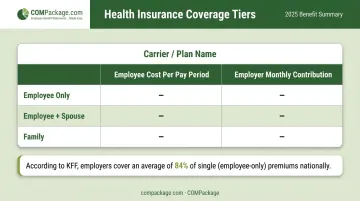
- Employee cost per pay period across coverage tiers (employee only, employee + spouse, family)
- Employer contribution — worth making explicit, since the 2025 KFF Employer Health Benefits Survey shows employers cover 84% of single premiums and 74% of family premiums on average
- What's covered at a high level — preventive care at 100%, prescription co-pay tiers, deductible
Sample medical entry format:
| Coverage Tier | Employee Cost/Pay Period | Employer Pays/Month |
|---|---|---|
| Employee Only | $28.00 | $389.00 |
| Employee + Spouse | $67.00 | $724.00 |
| Family | $112.00 | $958.00 |
Dental and vision follow the same logic — carrier, plan type, employee share, and a brief note on covered services (e.g., "two cleanings annually at 100%").
Financial and Retirement Benefits
For 401(k) plans, the summary entry should include:
- Plan type and IRS contribution limit for the current year
- Employer match structure (e.g., "50% of contributions up to 6% of salary")
- Vesting schedule, if applicable
- Match expressed as a dollar equivalent when possible — "employer contributes up to $2,400 per year" is more concrete and motivating than "50% match"
Short-term and long-term disability entries should state the income replacement percentage (commonly 60%), maximum benefit duration, and elimination period (the waiting period before benefits begin).
Time Off and Leave Benefits
PTO is consistently one of the most valued benefits — and one of the most vaguely communicated. Employees respond to concrete numbers, not policy language.
Write it this way:
- Vacation: 80 hours (years 1–5), 120 hours (years 6+)
- Sick leave: 40 hours per year
- Paid holidays: 11 days per year
- Parental leave: 6 weeks paid, available to all new parents
Additional and Voluntary Benefits
This section often gets cut for space — resist that impulse. Categories commonly omitted from summaries that employees genuinely value:
- FSA/HSA — include the contribution limit ($3,300 for health FSA in 2025; $4,300 HSA self-only)
- Employee Assistance Program (EAP)
- Tuition reimbursement and professional development stipends
- Commuter benefits
- Flexible work or remote work arrangements
- Voluntary ancillary benefits: accident coverage, critical illness, hospital indemnity
Non-quantifiable benefits (remote flexibility, development access) can be listed with brief descriptors rather than dollar amounts.
How to Use an Employee Benefits Summary Across the Employee Lifecycle
The same core document doesn't need to be rebuilt from scratch for every use case. Adjust the emphasis and add the right operational details for each stage.
Using the Summary in Recruiting
At the offer stage, candidates are comparing packages without time to read carrier documentation. A one-page summary gives them the information they need to evaluate your offer seriously.
Lead with your most differentiating benefits:
- Employer medical contribution percentage (if above the 84% single/74% family average, say so)
- 401(k) match expressed as a dollar value
- PTO as total days, not a vague "generous leave policy"
Research from WTW's 2024 Global Benefits Attitudes Survey found that 49% of employees chose their current employer specifically because of benefits. Employers who can articulate that value clearly at the offer stage have a measurable recruiting advantage.
Using the Summary During New Hire Onboarding
The onboarding version needs more operational detail than the recruiting version. New hires are making enrollment decisions — often irreversible until the next open enrollment — while simultaneously absorbing information across every department.
Add these elements to the onboarding version:
- Enrollment deadline (exact date, not "within 30 days")
- Enrollment platform URL and login instructions
- Coverage start date
- Who to contact with questions (name, email, phone — not just "HR")
Reducing friction here is the priority. A new hire who can't figure out how to enroll in the HSA before the deadline has effectively lost that benefit for the year.
Using the Summary During Open Enrollment
Open enrollment summaries should lead with what changed — not the full benefits overview. Employees who see the same document from last year assume nothing is different and re-enroll without reviewing.
According to Voya's 2024 open enrollment research, approximately 91% of benefits-eligible workers select the same health plan as the prior year — and in a separate finding, nearly half spend under 20 minutes reviewing benefit information before making decisions.
Lead the open enrollment summary with a "What's New This Year" section covering:
- New plan options or eliminated plans
- Premium changes (increases or decreases)
- Updated IRS contribution limits for HSA and FSA
- Any new voluntary benefits added
Then present the full benefits overview below it.
Step-by-Step: Creating Your Employee Benefits Summary
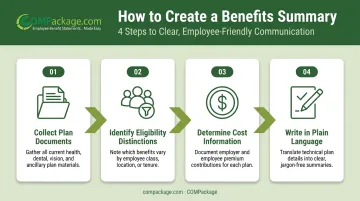
Creating a benefits summary is less about design and more about gathering the right inputs in the right order.
Step 1 — Collect current plan documents and carrier details Pull the most recent plan documents, SBCs, and carrier contact information. Confirm nothing has changed since last year.
Step 2 — Identify eligibility distinctions Flag which benefits are available to all employees vs. eligible subsets (full-time only, employees past a waiting period, salaried vs. hourly).
Step 3 — Determine what cost information to show Include the employee's share of premiums and, where possible, the employer's contribution. Showing only the employee cost understates what the company actually spends per employee.
Step 4 — Write in plain language Test each section with this standard: could a non-HR employee understand this in under 60 seconds? If not, simplify.
Common Decisions That Trip Up HR Teams
- Should salary be included? Generally no. Salary belongs in a total compensation report, not a benefits summary. Mixing them creates document confusion.
- How much cost detail is enough? Show premium tiers and employer contributions. Avoid mid-document tables of deductibles, out-of-pocket maximums, and coinsurance percentages — those belong in the SBC.
- How to handle location-specific differences? Use a master template with location-specific addenda rather than maintaining separate documents for each office.
Format and Distribution
Keep the document to one or two pages depending on package complexity. Publish it in at least two accessible locations — the HR intranet and the onboarding packet — so employees don't have to ask HR to track it down.
Best Practices for Keeping Your Benefits Summary Accurate
A benefits summary that's six months out of date does more harm than no summary at all — it erodes trust when employees find discrepancies.
Annual Update Checklist
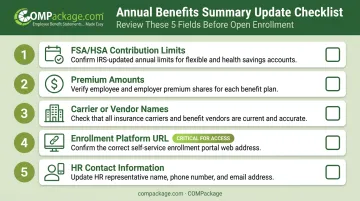
These five fields go stale most often and need review before every open enrollment:
- FSA/HSA contribution limits — IRS typically releases HSA limits in the spring and FSA limits in the fall each year
- Premium amounts — updated during carrier negotiations before open enrollment
- Carrier or vendor names — if any plans changed during the year
- Enrollment platform URL or login instructions — systems change more often than expected
- HR contact information — names and direct lines, not just department emails
Document Ownership Matters
Assign a named person to own the update process before the document is published. To keep updates from slipping, build three checkpoints directly into your open enrollment calendar:
- Assign a document owner by name before publishing
- Schedule a review 4-6 weeks before open enrollment opens
- Confirm the summary is distributed before employees receive enrollment instructions
The same WTW survey found that 54% of employees cited benefits as a reason to stay, and 40% said they would leave for better benefits elsewhere with no salary change.
Those numbers make the case clearly: a current, accurate, accessible summary functions as a retention tool just as much as compensation does.
For employers who want to go further, pairing a benefits summary with a total compensation report shows employees the employer's actual dollar investment in their package. COMPackage does this through self-service software that generates customized, dollar-denominated total compensation statements — giving employees a clear picture of what their full package is worth in a format they can reference year-round.
Frequently Asked Questions
What is usually included in a summary of benefits?
A complete benefits summary covers health insurance (medical, dental, vision), retirement plans, life and disability insurance, paid time off, and voluntary or ancillary benefits. Well-designed summaries also include enrollment deadlines and employer contribution amounts so employees understand both what they have and what it costs the company.
What is an employee benefits statement?
An employee benefits statement is a plain-language communication document summarizing available benefits for an employee. It differs from legally required plan documents like SPDs and SBCs, which exist for compliance and participant rights disclosure rather than everyday employee communication.
What are some examples of employee benefits?
Common categories include:
- Medical, dental, and vision insurance
- 401(k) with employer match
- Short- and long-term disability
- Paid vacation, sick leave, and holidays
- Employer-paid life insurance, FSA/HSA accounts, and EAP
- Voluntary benefits like accident or critical illness coverage
How is an employee benefits summary different from a total compensation report?
A benefits summary lists what benefits an employee has access to. A total compensation report shows the full dollar value of everything the employer pays — base salary, premium contributions, retirement match, taxes, and perks — giving employees a complete picture of what their employment is actually worth.
When should you share an employee benefits summary with employees?
Share it at three points in the employee lifecycle:
- At the job offer stage, so candidates can evaluate the full package
- During new hire onboarding, within the enrollment window
- At the start of open enrollment each year, before coverage decisions are made
How often should an employee benefits summary be updated?
At least once a year before open enrollment. Additional updates are needed whenever plan changes, carrier switches, or IRS contribution limit adjustments occur mid-year. Assigning a named owner to the update process prevents the document from going stale between cycles.