Introduction
Ask an employee what they earn, and they'll usually give you one number: their salary. Ask an employer what they spend on that same employee, and the number looks a lot different once benefits, taxes, and perks get added in.
That gap causes real damage. 42% of employees who voluntarily quit their jobs said the departure could have been prevented, according to Gallup research on preventable turnover. Additional compensation or benefits was the single most common fix those employees suggested.
A benefit statement template closes that gap. It turns a vague "we offer a great package" into a specific, personalized dollar figure each employee can actually see.
This guide covers what belongs in a benefit statement template, the different types you'll need for different situations, and how to build one yourself, whether that's in a spreadsheet or with purpose-built software.
Key Takeaways
- A benefit statement template turns abstract benefits into a personalized, itemized dollar figure for each employee.
- Separate quantifiable benefits (insurance, retirement match, PTO) from non-quantifiable perks (flexibility, development).
- Annual, new-hire, and pension statements each need their own structure and level of detail.
- Small teams can build statements manually, but software handles an entire employee census in hours, not weeks.
What Is a Benefit Statement Template?
A benefit statement template is a standardized layout used to show the dollar value of what an employee receives beyond their paycheck. Instead of a generic list of "we offer health insurance," it shows this specific employee that their employer contributed, say, $9,600 toward their health plan this year.
"Benefit statement" and "total compensation statement" get used interchangeably, but they're not quite the same thing:
- A benefit statement focuses on the value of benefits: insurance, retirement contributions, PTO, and similar line items
- A total compensation statement adds salary, bonuses, and other pay on top of those benefits, giving a full picture of what an employee actually costs (and earns)
The distinction matters because most employees drastically underestimate the second number. For U.S. civilian workers, benefits made up 31.6% of total employer compensation costs as of March 2026, with wages and salaries covering the remaining 68.4%, according to the Bureau of Labor Statistics' Employer Costs for Employee Compensation report.
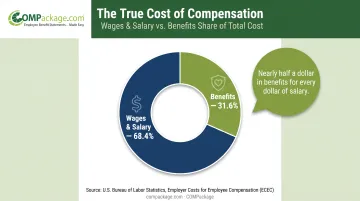
In other words, for every dollar an employee sees in salary, their employer is spending close to half a dollar more that never shows up on a pay stub.
Who Typically Uses Benefit Statement Templates
These templates aren't just an HR tool for large corporations. In practice, they're used by:
- Small and mid-sized businesses trying to justify pay decisions and reduce turnover
- Insurance agencies delivering a value-added service at renewal time
- HR and benefits consultants building client deliverables
- Accounting firms adding total-compensation reporting to year-end or advisory services
- Payroll providers looking to round out their service offering
For every one of these audiences, format matters more than most people expect. A dense PDF full of financial jargon gets skimmed and ignored. A branded, visual report with clear charts gets read, discussed, and remembered — and that delivery choice decides whether employees engage with the numbers or file them away unread.
What to Include in Your Benefit Statement Template
The core principle: capture every dollar of investment, not just the headline benefits. Skipping smaller line items like payroll tax contributions or life insurance premiums understates what the employer actually spends, which defeats the purpose of the statement.
Core Quantifiable Benefit Categories
These are the line items with a real, calculable dollar figure attached:
- Health, dental, and vision insurance - the employer-paid portion of the annual premium
- Retirement contributions - 401(k) match dollars or pension plan contributions
- PTO and holiday pay - vacation, sick time, and holidays valued at the employee's daily rate
- Life and disability insurance - annualized premium cost paid by the employer
- Payroll tax contributions - the employer's share of Social Security, Medicare, and unemployment taxes
Calculating these accurately means using real numbers, not estimates. COMPackage customer data shows how much fringe benefits add: Napa Valley Petroleum found benefits added 35% to compensation for its lowest-paid workers, and as much as 50% for others. Bullard Manufacturing calculated fringe benefits added 42% to 52% to annual pay.
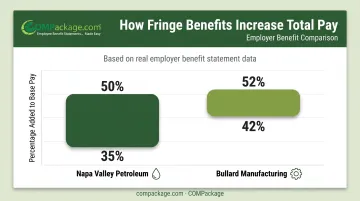
Those aren't small rounding errors. They're the difference between an employee thinking they earn $18/hour and realizing their true value is closer to $27/hour.
Non-Quantifiable and Unique Benefit Categories
Not every valuable benefit has a hard dollar figure. These still influence whether someone stays or leaves, even without a line-item cost:
- Flexible schedules
- Wellness programs
- Professional development
- Employee assistance programs
COMPackage's platform includes a library of more than 80 pre-built benefit and perk categories, covering wellness programs, tuition assistance, cell phone stipends, parking benefits, and more—so businesses aren't starting from a blank page.
One important rule: customize the template per employee. A statement listing tuition reimbursement for someone who doesn't qualify looks sloppy and erodes trust. Only benefits that specific employee actually receives should appear on their report.
Types of Benefit Statement Templates and Where to Get One
Not every statement serves the same purpose. Three types cover most use cases:
- Annual/open enrollment statements: Yearly reports showing the full value of current benefits, usually shared alongside enrollment decisions
- New-hire offer statements: Recruiting tools that show candidates the full value of an offer, not just base salary
- Pension/retirement benefit statements: Legally governed disclosures required for ERISA-covered retirement plans
Employees clearly want more than a once-a-year update. According to LIMRA's 2026 BEAT research, 73% of employees want benefits information several times a year, yet 45% only hear about it during open enrollment. Treat the annual statement as a baseline, not the only touchpoint.
Pension Statement Requirements
Of the three types, pension statements carry the strictest rules. ERISA-covered plans have legally mandated disclosure requirements that differ by plan type:
| Plan Type | Required Frequency |
|---|---|
| Participant-directed defined contribution | At least quarterly |
| Other defined contribution plans | At least annually |
| Defined benefit plans | At least every 3 years |
These statements must also be written so the average plan participant can understand them. Given how specific and evolving these rules are, confirm current requirements with a benefits attorney or the Department of Labor before finalizing a pension statement template.
Where to Get a Benefit Statement Template
- Free downloadable templates (Word or Excel): Fine for a handful of employees, but manual and error-prone at scale
- Payroll or HRIS providers: Some bundle a basic statement feature, though customization is often limited
- Benefits consultants: Can build statements for you, usually at an ongoing cost
- Dedicated self-service software (such as COMPackage): Built to generate and update reports in-house without a consultant each time something changes
How to Create Your Own Benefit Statement Template
Building a benefit statement isn't complicated, but it does require the right sequence.
Gather accurate data first. Collect each employee's salary, employer-paid insurance premiums, retirement contributions, and PTO value before you build anything. Bad data in means a statement nobody trusts.
Choose your build method. A manual spreadsheet works for a five-person team. Beyond that, the risk of copy-paste errors and outdated formulas grows fast, which is where dedicated software starts paying for itself.
Add company branding. A logo, brand colors, and a professional layout turn a spreadsheet printout into an official company document employees take seriously.
Use bulk-import tools for larger teams. Manual methods break down once headcount climbs. Import your full employee census from Excel, map columns once, and let auto-calculators handle insurance, 401(k), and PTO values so you generate statements in hours instead of days.
Set a distribution schedule. Annual or open-enrollment timing works for most companies, with the ability to make manual edits whenever salaries or benefits change mid-year.
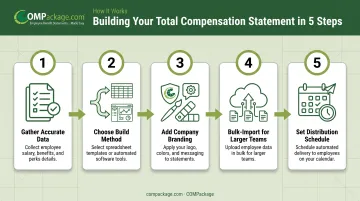
Dedicated software shortens that path. COMPackage's Employee LOADER imports an entire census from an Excel file and maps existing column headers automatically. Combined with 12 auto-calculators for insurance, 401(k), and PTO, a company can generate statements for its whole workforce in hours rather than days or weeks.
DYWIDAG Systems Worldwide's payroll administrator noted employees liked seeing information on their annual report they'd never seen before. Housewright Construction has used the same approach for six-plus years.
For accounting firms, benefits consultants, and other providers managing multiple clients, COMPackage's Professional tier includes:
- Unlimited client statements
- Custom branding per client
- Sublicense access for volume work
Best Practices and Common Mistakes to Avoid
Even a well-designed template can backfire if the execution is sloppy. Watch for these three issues.
- Verify data before distribution. An incorrect premium or missing benefit line damages trust more than sending nothing. Spot-check against payroll before anything goes out.
- Stick to a consistent schedule. A one-off statement in a good year that disappears the next feels like a gimmick. Set a cadence—even annually with open enrollment—and hold to it.
- Keep the language simple and visual. Dense financial jargon loses people fast. Charts, clear breakdowns, and plain language work better from entry-level staff to senior management.
Frequently Asked Questions
What is a benefit statement document?
It's a personalized breakdown of the dollar value of an employee's employer-paid benefits beyond the paycheck. It typically covers insurance, retirement contributions, PTO, and similar perks.
Where can I get a benefit statement?
Free Word or Excel templates work for very small teams. Payroll or HRIS providers sometimes bundle basic versions; benefits consultants can build them for a fee. Dedicated self-service software offers the best accuracy at scale.
What are the requirements for an annual pension benefit statement?
ERISA-covered retirement plans have specific disclosure rules covering frequency and required data points, which vary by plan type. Confirm current requirements with a plan administrator or benefits attorney, since these rules are periodically updated.
What's the difference between a benefit statement and a total compensation statement?
A benefit statement focuses purely on the value of employer-paid benefits. A total compensation statement adds salary, bonuses, and other pay on top, giving employees the full financial picture of their employment.
How often should a company issue benefit statements?
At least annually, ideally timed with open enrollment or performance reviews. Also update statements whenever benefits or pay change, since many employees want a current view more than once a year.
Can small businesses create benefit statements without hiring a consultant?
Yes. Affordable self-service software lets small businesses generate professional, branded statements in-house within a few hours, without ongoing consultant fees.