Introduction
Managing benefits programs across a book of 20, 30, or 50 clients simultaneously is nothing like running HR for a single employer. HR consultants juggle different plan structures, carrier relationships, compliance calendars, and employee populations—all at once, often with lean teams.
The margin for error is thin. A missed ACA filing deadline, a payroll deduction that doesn't match an employee's election, or a COBRA notice sent three days late can expose both the consultant and their client to real liability.
The most effective consultants systematize their expertise across clients through purpose-built technology. According to a 2021 broker survey by Wellfleet and EIS Group, 42% of benefits brokers cited slow data processing as a top enrollment pain point.
Another 36% struggled with census-file errors — and each mistake is a direct hit to client confidence.
This guide breaks down the key categories of employee benefits broker software, how to build a practical tech stack, and which tools—including a frequently overlooked but high-impact category—deliver the most measurable value to clients.
Key Takeaways
- Benefits broker software spans multiple categories—each solving a distinct problem, not a single tool that handles everything.
- Benefits administration platforms reduce enrollment errors and give employees self-service access to their plans.
- Compliance tools automate ACA, COBRA, and HIPAA requirements across multiple client accounts.
- Total compensation reporting is the most underutilized category: it directly reduces turnover by showing employees the full value of what they earn.
- Build your tech stack by layering complementary tools, starting with a core administration platform as the foundation.
Why HR Consultants Need Specialized Benefits Broker Software
HR consultants operate fundamentally differently from in-house HR teams. An in-house HR manager handles one employer, one payroll system, and one set of compliance obligations. A consultant handles dozens—each with different carriers, plan designs, employee demographics, and regulatory exposures.
Generic HR software isn't built for that. It assumes a single employer context. Multi-client management, cross-account reporting, and book-of-business visibility typically aren't native features—they're workarounds at best.
The Real Cost of Poor Benefits Communication
The operational risk of manual or disconnected benefits reporting compounds quickly across a large client portfolio:
- Employees who don't understand their total compensation package undervalue their benefits — and blame their employer for it
- Consultants manually producing one-off compensation reports for each client waste hours that could go toward higher-value advisory work
- Inconsistent report formats across clients make it harder to demonstrate the full scope of benefits you've helped design
- Without a scalable reporting tool, growing a client roster means growing the manual workload proportionally
Compensation transparency directly affects retention. Employees who receive a clear, itemized view of their total compensation — salary, health benefits, retirement contributions, PTO value, and more — report higher satisfaction with pay even when base salary doesn't change. For consultants, that's a deliverable with measurable client impact.
Client expectations have shifted, too. More than one-quarter of employers in a BenefitsPRO survey said their broker should take primary responsibility for recommending benefits technology solutions. Consultants who can't demonstrate a clear tech-enabled process are increasingly seen as outdated — regardless of how strong their carrier relationships are.
Core Categories of Employee Benefits Broker Software
Benefits Administration and Enrollment Software
Benefits administration platforms are the foundation of any consultant's tech stack. They centralize plan management, automate open enrollment workflows, and give employees a self-service portal to review, compare, and elect their benefits.
Well-known platforms in this category include Gusto, ADP Workforce Now, and Rippling—each with varying degrees of broker-specific functionality:
- Gusto allows brokers to upload plan documents, rate sheets, and invoices, with notifications for new-hire enrollments and qualifying life events
- ADP Workforce Now offers a Broker Partnership program with access to client eligibility and enrollment data, plus connections to over 900 insurance carriers
- Rippling's Client Command Center lets brokers manage an entire book of business from one dashboard, with cross-client reporting and integration with benefits platforms like Employee Navigator
Key features consultants should prioritize when evaluating these platforms:
- Multi-employer account management from a single login
- Mobile access so employees can complete enrollment from any device
- Carrier integration breadth (the more pre-built connections, the better)
- Eligibility tracking and automated qualifying life event workflows
Compliance Management and Reporting Tools
For HR consultants managing mid-sized employer clients, compliance touches every corner of the engagement. ACA reporting obligations, COBRA administration timelines, HIPAA data handling requirements, and FMLA tracking all run simultaneously across every client account.
The penalties for getting it wrong are not trivial:
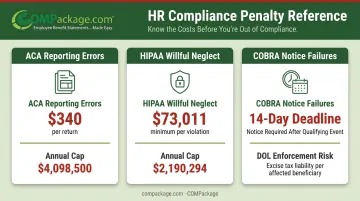
- ACA reporting errors: Up to $340 per return, with annual caps of $4,098,500 per calendar year
- HIPAA willful neglect violations: Minimum $73,011 per violation, with calendar-year caps of $2,190,294
- COBRA notice failures: The election notice must go out within 14 days of receiving qualifying event notice—late notices can trigger DOL enforcement
Automated compliance tools track these deadlines across client accounts, generate audit-ready documentation, and flag issues before they become violations.
Strong reporting tools should deliver:
- Real-time enrollment dashboards by client
- Participation rate analytics to identify low-uptake plans
- Cost-per-employee tracking to support plan design decisions
- Exportable documentation formatted for audits or carrier reconciliation
Payroll Integration Systems
Benefits data that doesn't flow directly into payroll creates deduction errors. And deduction errors are expensive—EY research reported by HR Executive found that 1 in 5 U.S. payrolls contains errors, with each error costing employers an average of $291. For a 1,000-person organization, preventable payroll mistakes can approach $1 million annually.
Manual data transfers between a benefits system and a payroll platform are one of the most common sources of these errors. When an employee changes their health plan election during a qualifying life event, that change needs to cascade automatically to payroll—not sit in a spreadsheet waiting to be keyed in.
When evaluating payroll integration capabilities, look for:
- Pre-built integrations with the payroll platforms your clients actually use
- Real-time or near-real-time data sync (not nightly batch files)
- Automatic deduction updates triggered by enrollment changes
- Error logging so deduction mismatches are flagged before payroll runs
Employee Communication and Engagement Tools
Most consultants underinvest in this category. A client can have a strong benefits package — competitive health coverage, generous PTO, solid retirement matching — and still face low voluntary enrollment, open enrollment confusion, and employee dissatisfaction with their compensation.
The data reflects a real gap. In an EBRI survey, 37% of workers said their employer or benefits company provided no benefits education or advice. A separate 2025 survey found that 65% of employers saw room to improve how they communicate benefits to employees.
Tools in this category include:
- Online enrollment guides and decision-support tools that walk employees through plan comparisons
- Educational portals with on-demand video explainers for health, dental, vision, and voluntary benefits
- Year-round communication platforms that keep employees engaged between open enrollment windows
- Total compensation reports that show employees the full value of their package, including employer-paid benefits they may not recognize
- Gamification elements that reward benefits literacy
For consultants, helping clients communicate benefits effectively is a visible, differentiated service. It shows up in engagement scores, retention rates, and renewal conversations.
Total Compensation Reporting: The Most Overlooked Category
Most employees dramatically underestimate what their employer actually spends on them. According to EBRI's 2025 Workplace Wellness Survey, workers estimated that benefits represented just 16% of their total compensation. The reality, according to the Bureau of Labor Statistics, is 31.6%—roughly double what employees perceive.
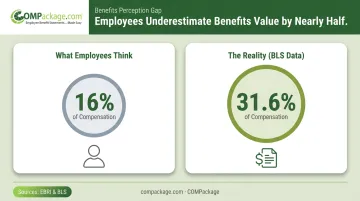
That perception gap has consequences. Employees who don't understand the full value of their compensation are more likely to leave for a competitor offering a marginally higher base salary—without realizing they may be giving up thousands of dollars in employer-paid benefits.
What Total Compensation Reporting Software Does
Total compensation reporting tools generate individualized statements that show each employee their complete compensation picture:
- Base salary
- Employer-paid health, dental, and vision insurance premiums
- Retirement plan contributions
- Paid time off (calculated as a dollar value)
- Life insurance, disability coverage, and other employer-paid perks
- Non-quantifiable benefits like flexible schedules or remote work arrangements
The statement translates an abstract benefits package into a concrete number—what an employee actually earns, not just what hits their bank account.
The Consultant Opportunity
This is where HR consultants can set themselves apart. Offering total compensation reporting as part of a client engagement demonstrates ROI on the benefits spend—it helps employees appreciate plans the client is already paying for.
The retention math is straightforward. SHRM estimates that replacing an employee costs 50–200% of their annual salary. If a total compensation statement prevents even a handful of exits per year at a mid-sized client, it pays for itself many times over.
COMPackage: Purpose-Built for This Use Case
COMPackage is a self-service total compensation statement platform designed specifically for this category. For HR consultants managing multiple client accounts, it offers several practical advantages:
- Covers over 80 benefit categories, from standard health coverage to non-quantifiable perks like remote work—far broader than most reporting tools
- Bulk-imports employee data from Excel via the Employee LOADER, eliminating one-by-one manual entry
- Calculates common benefit values automatically with 12 built-in auto-calculators, cutting manual data entry time
- Applies client logos and custom report colors per account, so every deliverable looks client-facing and professional
- Scales from 5 to 5,000 employees, matching the small and mid-market accounts most consultants manage
As a standalone reporting layer, COMPackage sits on top of existing payroll and benefits systems. Consultants import compensation data and generate branded statements the same day, with no disruption to current tools or workflows.
Building and Evaluating Your Benefits Tech Stack
Start with the Core, Then Layer
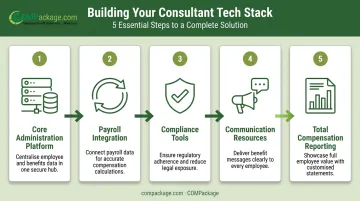
The most practical approach to building a consultant tech stack:
- Core administration platform first — Choose a benefits administration system with multi-employer management, carrier integrations, and open enrollment automation
- Add payroll integration — Ensure benefits elections sync directly to the payroll systems your clients use
- Layer compliance tools — Either as a standalone solution or as a feature set within your administration platform
- Add communication resources — Employee-facing tools that extend engagement beyond the annual enrollment window
- Complete with total compensation reporting — The "last mile" layer that closes the gap between what clients offer and what employees actually understand
The 2021 Wellfleet/EIS broker survey found that 84% of brokers considered easy integration with a client's existing systems very or extremely important when recommending solutions. Compatibility with existing client systems is the baseline evaluation criterion, not a bonus feature.
Evaluation Criteria for Consultant-Specific Use
When assessing any tool for your stack, prioritize:
- Multi-client management — Can you manage accounts independently without data bleeding between clients?
- Flexible pricing — Per-employee-per-month models work for some clients; flat-rate or annual licensing works better for others
- White-labeling — Can you brand the client experience with their logo and your firm's identity?
- Scalability — Can you add or remove clients without complex contractual changes?
- Implementation speed — How quickly can a new client be onboarded and operational?
- Data security — Does the platform handle sensitive compensation data with appropriate protections?
Total compensation reporting fits this framework as an add-on that requires minimal integration work: data goes in via import, branded statements come out. For consultants looking to add visible value without added overhead, it's a straightforward layer — short setup time, immediate deliverable for the client.
Frequently Asked Questions
What is employee benefits broker software?
Employee benefits broker software covers the tools HR consultants and benefits brokers use to manage plan enrollment, compliance, payroll integration, and employee communication — built for multi-client management rather than a single employer's in-house HR team.
How is benefits administration software different from total compensation reporting software?
Benefits administration software manages the operational side—enrollment, carrier data feeds, eligibility tracking, and deductions. Total compensation reporting software focuses on communicating the full value of compensation to employees. Used together, they cover both the operational and employee-facing sides of benefits management.
What features should HR consultants prioritize when evaluating benefits broker software?
The most critical features are multi-client account management, payroll and carrier integrations, compliance automation (ACA, COBRA, HIPAA), and the ability to scale up or down across client sizes without complex pricing changes.
Can small business clients benefit from total compensation reporting software?
Yes. Total compensation reporting isn't limited to large employers. Affordable self-service solutions like COMPackage are specifically designed for companies with as few as 5 employees, making them practical for the small business clients that many HR consultants serve.
How does total compensation software help reduce employee turnover?
When employees see the full monetary value of their benefits alongside their salary, they gain an accurate picture of their total earnings — making them less likely to leave for a competitor offering slightly higher base pay without comparable benefits.
How much does employee benefits broker software typically cost?
Pricing depends on the category. Benefits administration platforms typically charge per-employee-per-month, while total compensation reporting tools like COMPackage use flat annual licensing based on employee count. Consultants should weigh total cost of ownership against time saved and value delivered to clients.