Introduction
Most employees glance at their paycheck, see a number, and assume that's their pay. It's not the full picture.
That number skips employer-paid health insurance, the 401(k) match, PTO accrual, and a dozen other line items that never hit a bank account but still represent real money spent on each employee.
When that gap stays hidden, pay satisfaction takes the hit. Pew Research found that only 30% of U.S. workers said they were extremely or very satisfied with their pay in 2024, down from 34% the year before — a signal that pay satisfaction is slipping even as employers spend more on total rewards.
This guide breaks down what a compensation report actually is, the different types businesses use, why they matter for retention and recruiting, and how to build one, including with software like COMPackage.
Key Takeaways
- A compensation report shows the full value of pay, not just cash wages on a check
- Three report types matter: employee statements, HR benchmarks, and tax/legal reasonable-compensation reports
- Employee satisfaction with pay has been declining, so total pay visibility helps retain talent
- Pay transparency laws in over a dozen states are pushing structured compensation disclosure
- Purpose-built software can generate reports for an entire employee census in hours, not weeks
What Is a Compensation Report?
A compensation report is a formal document that details what an employee or executive is actually paid. It goes beyond the paycheck to show base pay, bonuses, employer-paid benefits, and perks: the full financial relationship between employer and employee.
Compensation Report vs. Pay Stub
These two documents get confused constantly, but they answer different questions.
- A pay stub shows cash wages for a single pay period: gross pay, taxes withheld, deductions, and net pay
- A compensation report shows the annual dollar value of everything the employer provides, cash and non-cash combined
A pay stub tells you what hit your bank account this cycle. A compensation report tells you what your employer actually invested in you over the year.
Why Getting This Right Matters Financially
"Compensation report" is really an umbrella term. It can mean an employee-facing statement, an internal HR benchmarking document, or a legal compliance filing. Confusing the three wastes effort or creates compliance gaps. We'll break down each type in the next section.
The financial stakes of communicating pay accurately are real. The Center for American Progress reviewed 30 case studies and found the median cost of replacing an employee runs about 21% of that employee's annual salary, with costs ranging from under 6% to over 200% depending on the role's seniority and specialization.
A clear compensation report that keeps someone from walking out the door is cheap insurance against that cost.
Who typically works with these reports:
- HR teams and compensation managers
- Business owners and finance leaders
- Benefits consultants and insurance agents
- Payroll providers and accounting firms
- Auditors and tax professionals
Types of Compensation Reports Explained
Not every "compensation report" serves the same audience or purpose. Mixing them up (for example, using an internal benchmarking format for employee communication) leads to wasted work or documents that don't hold up under scrutiny.
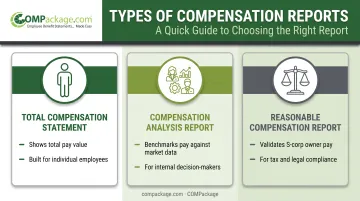
Total Compensation Statements/Reports
These are employee-facing documents built to show one person the full value of their pay package. A well-built statement includes:
- Base salary or hourly wages
- Bonuses and commissions
- Health, dental, and vision insurance contributions
- Retirement plan contributions
- PTO value and non-quantifiable perks like flexible scheduling
These statements support retention and recruiting. They make the "hidden paycheck" visible so employees stop underestimating what they're actually worth to the company.
Compensation Analysis Reports
These are internal documents, typically built by HR or finance teams for internal use, not employee distribution. They compare pay data against market benchmarks, internal pay equity, and salary bands.
WorldatWork describes this benchmarking process as pulling from salary surveys, government data, and consulting reports segmented by geography, industry, and company size to guide raises, promotions, and hiring offers. Nobody hands this to a new hire. It's a decision-support tool.
Reasonable Compensation Reports
This is a narrower, specialized category. These reports validate executive or shareholder-employee pay against IRS standards and industry norms, most commonly for S-corporation owners.
The IRS requires S-corp shareholder-employees to receive reasonable compensation for services before taking non-wage distributions. If pay looks artificially low, the agency can reclassify distributions as wages.
Building a defensible report takes expert analysis of duties, hours, comparable pay data, and documentation. It is a tax and legal compliance tool, not an employee communication piece.
Why Compensation Reports Matter for Your Business
Employees consistently undervalue what they're actually paid. They see the salary number and mentally stop there, ignoring everything employers spend on benefits behind the scenes.
The Retention Angle
Showing total compensation makes current pay feel more competitive — without cutting a raise check. An employee who sees $58,000 in salary plus $14,000 in benefits and perks has a very different reaction than one who only sees the $58,000.
The Recruiting Advantage
Candidates react to itemized offers differently than to a bare number. SHRM's research backs this up from the hiring side: in a 2023 survey, 82% of workers said they were more likely to apply to a posting that listed pay information, and 73% said transparency made them trust the employer more.
An offer letter that itemizes salary, benefits, and perks tends to land better than a single salary figure. Candidates can actually see what they're getting.
The Compliance Angle
Pay transparency laws are spreading fast. States including California, Colorado, Washington, New York, and Illinois now require some form of compensation disclosure in job postings or during hiring. That trend is pushing structured, itemized reporting from a nice-to-have toward a business norm.
Where Software Fits In
COMPackage's total compensation report software was built for companies with 5 to 5,000 employees that want the retention and recruiting benefits of total compensation statements without hiring an outside consultant.
Key Components of an Effective Total Compensation Report
A credible report isn't a generic list slapped on every employee. It reflects what each person actually receives.
Core components every report should include:
- Base salary or hourly wage (plus overtime, where applicable)
- Bonuses and commissions
- Employer-paid health, dental, and vision insurance
- Mandated employer costs (Social Security, Medicare, workers' comp)
- Retirement plan contributions (401(k), pension, etc.)
Often-overlooked items that add real value:
- PTO and holiday pay, converted to a dollar figure
- Life and disability insurance premiums
- Wellness perks and program value
- Non-quantifiable benefits such as flexible schedules or remote-work options
COMPackage's default template is built around this full picture. It organizes reports into mandated benefits, time-off, insurance, retirement, and special/fringe benefits, drawing from a library of more than 80 preprogrammed benefit categories.
The key rule: only show what's relevant to that specific employee. A category should appear on someone's report only if it has an actual financial value for them. A generic, company-wide list undermines credibility fast. Employees notice when a report includes a benefit they don't actually get.
How to Create a Compensation Report: Step-by-Step
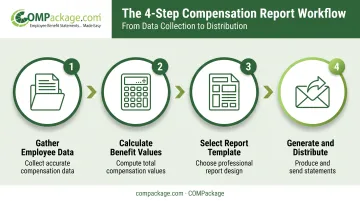
Building a report follows a consistent process, whether you're doing it by hand or with software.
- Gather employee-specific data: pay, bonuses, and every benefit category that applies to that individual
- Calculate the dollar value of each benefit: health premiums, retirement match, PTO days converted to pay
- Select or build a report template that presents the information clearly, ideally with company branding
- Generate and distribute the finished reports to employees
Doing this manually in spreadsheets for a handful of employees is manageable. Doing it for an entire census gets tedious fast. Every employee needs individually calculated values, and errors creep in easily when you're copying formulas across hundreds of rows.
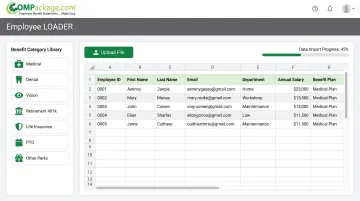
Purpose-built software removes most of that friction. COMPackage customers use the Employee LOADER to import an entire census from Excel, map columns to the platform's fields, and load 100 or 1,000 employee records in minutes.
A full census, from import through report generation, typically wraps in under 90 minutes.
One more rule of thumb: don't wait until year-end. Update reports whenever pay or benefits actually change — after raises, during open enrollment, or when new perks roll out. A stale report is almost as misleading as no report at all.
Choosing the Right Compensation Reporting Software
Platform differences matter more once you're generating reports for a real employee count.
Evaluate any platform against these criteria:
- Self-service usability — can your team run it without a dedicated administrator or consultant?
- Bulk import capability — does it handle a full census, or only one employee at a time?
- Customization — can you add your logo and adjust report colors?
- Pricing transparency — are costs published clearly, or do you need a sales call to get a number?
- Ongoing support and updates — is help included, or billed separately?
Why Cost Structure Trips Up Small Businesses
Many total compensation platforms were originally built for large enterprises and price accordingly, charging significant per-report or per-employee fees. That structure gets expensive fast for a 40-person company that just wants annual statements for its own team.
Where COMPackage Fits
COMPackage was built specifically to remove that barrier. Its self-service model lets a business handle the entire process in-house rather than paying a consultant per report. Pricing runs on simple employee-count tiers. Selected examples:
| Employee Count | Annual Price |
|---|---|
| 1–5 | $149 |
| 16–25 | $399 |
| 51–75 | $999 |
| 101–150 | $1,699 |
| Unlimited | $2,599 |
A Professional version at $2,999 per year is built for insurance agencies, benefits consultants, and accounting firms managing reports across unlimited clients.
Beyond pricing, COMPackage's Employee LOADER handles bulk Excel imports and its library covers 80+ benefit categories. You can regenerate reports free any time pay or benefits change during the subscription year.
A full census, start to finish, typically takes hours rather than the days or weeks manual preparation usually requires.
Frequently Asked Questions
What is a compensation report?
A compensation report details an employee's full pay package, including salary, bonuses, and benefits—not just the cash wages shown on a paycheck.
What's the difference between a total compensation statement and a pay stub?
A pay stub shows only the wages paid during a single pay period, along with taxes and deductions. A total compensation statement shows the full annual value of pay plus all employer-provided benefits.
What should be included in a total compensation report?
Standard components include base pay, bonuses, employer-paid health/dental/vision benefits, retirement contributions, and PTO value. Overlooked extras like wellness perks or professional development should also appear when relevant.
How often should companies issue compensation reports to employees?
At least annually, ideally tied to year-end or open enrollment. Update reports whenever pay or benefits change significantly, rather than letting employees see outdated figures for months.
Are compensation reports legally required?
Total compensation statements aren't federally mandated. However, pay transparency laws in states like California, Colorado, and Washington increasingly require related compensation disclosures during hiring.
How much does compensation reporting software typically cost?
Costs vary widely by provider and employee count, and some platforms charge per-report fees. Self-service options like COMPackage offer tiered annual pricing starting around $149 for small teams.