The problem? That number is wrong. Or rather, it's incomplete.
According to the Bureau of Labor Statistics, benefits add $15.60 per hour on top of wages for civilian workers — meaning the average employer spends 31.6% more than the paycheck suggests. Employees who never see that figure have no way to accurately assess what they're actually worth to their employer.
This article breaks down the difference between reported pay and compensation actually paid, explains why that gap matters for pay-for-performance alignment, and shows practical steps employers can take to close it.
Key Takeaways
- Total compensation goes beyond salary — it includes benefits, employer taxes, retirement matches, insurance premiums, and non-cash perks
- Employees consistently undervalue their total compensation when they never see the full picture
- Pay-for-performance alignment breaks down when employees only benchmark against base salary
- Only 46% of organizations currently provide total rewards statements to employees
- Total compensation reports are the most direct fix for the perception gap
Pay vs. Compensation Actually Paid: Quick Comparison
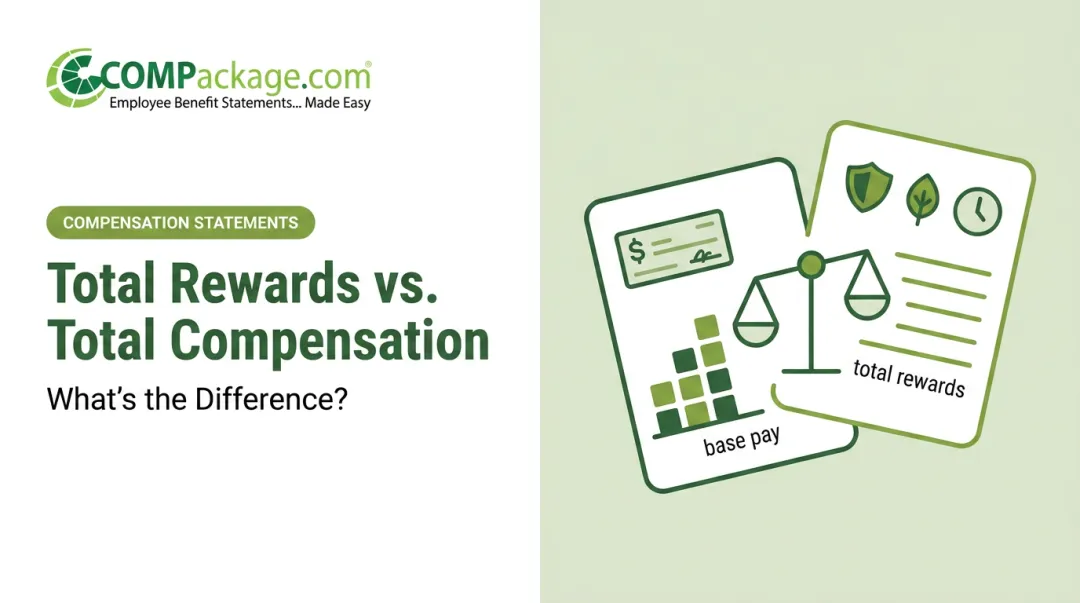
Both terms describe how an employee is paid — but they capture very different amounts and serve very different purposes.
| Base / Reported Pay | Compensation Actually Paid | |
|---|---|---|
| What it includes | Salary or hourly wages only | Base pay + all employer-provided value |
| Where it appears | Pay stub, offer letter, W-2 | Total compensation statement |
| What it misses | Benefits, taxes, perks, retirement | Nothing — it's the full picture |
| Best used for | Market benchmarking, equity analysis | Employee-facing compensation conversations |
For the average private-sector worker, compensation actually paid runs 30.1% higher than wages alone, adding up to an extra $14.01 per hour that rarely appears on a pay stub or offer letter.
What Is Base / Reported Pay?
Base pay is the fixed cash amount agreed upon in an employment contract — a salary or hourly rate. It's the number on the offer letter, the pay stub, and W-2 Box 1. When most people say "what someone makes," this is what they mean.
That familiarity makes base pay a useful reference point — but only up to a point.
Strengths of base pay as a reference point:
- Easy to benchmark against market salary surveys
- Comparable across roles, industries, and geographies
- Straightforward to discuss in performance reviews or negotiations
Where it falls short:
- Excludes all variable compensation and employer contributions
- Ignores the significant cost employers absorb for benefits
- Creates a distorted baseline for pay-for-performance evaluation
Because base pay dominates job postings, offer letters, and most payroll systems, it becomes the default mental anchor for employees. When compensation conversations stop there, both sides underestimate the true cost of employment — and the true value of the package on the table.
What Is Compensation Actually Paid?
Compensation actually paid (CAP) is the full, all-in value of everything an employer provides: every dollar and benefit that flows from the employment relationship.
The SEC uses this term specifically for executive equity disclosures in public company proxy statements. The underlying concept, though, applies to every employer: total compensation is substantially larger than take-home pay.
The Core Components
Here's what makes up CAP for the average employee:
- Cash compensation — base salary, bonuses, commissions, overtime
- Employer-paid insurance — health, dental, vision, life, disability premiums. The KFF 2025 Employer Health Benefits Survey reports employers cover an average of $7,885 annually for single coverage and $20,143 for family coverage
- Retirement contributions — 401(k) matching averaged a record 4.7% of pay in 2024 per Vanguard
- Paid leave — vacation, sick days, and holidays represent $3.72 per hour in employer cost for civilian workers, per BLS
- Employer payroll taxes — Social Security (6.2%), Medicare (1.45%), FUTA (6.0% on first $7,000 of wages), plus state unemployment taxes
- Non-cash perks — remote work flexibility, company car, tuition reimbursement, wellness programs, employee assistance programs
Why the Gap Is So Large — and So Hidden
BLS data from March 2026 breaks down civilian worker compensation per hour:
| Component | Per Hour | Share of Total |
|---|---|---|
| Wages and salaries | $33.72 | 68.4% |
| Paid leave | $3.72 | 7.5% |
| Insurance (health + other) | $4.18 | 8.5% |
| Retirement and savings | $2.56 | 5.2% |
| Legally required benefits | $3.39 | 6.9% |
| Total compensation | $49.32 | 100% |
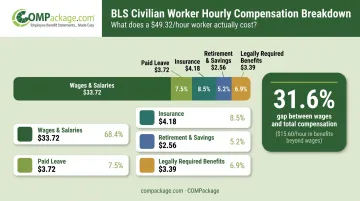
The perception gap is structural. Because employees never receive a single document totaling these items, they default to salary as their compensation. One example from COMPackage's sample reports shows an employee with a $56,000 base salary receiving an additional $32,138 in company-paid benefits — over 60% more than wages alone.
COMPackage's self-service software makes this full picture visible, generating individualized statements that turn a benefits package into a dollar-by-dollar breakdown each employee can actually see.
Pay vs. Performance: Which Measure Drives Retention?
The pay-for-performance principle is straightforward: employees stay motivated when they feel their compensation reflects their contribution. The catch is that "compensation" in an employee's mind usually means salary.
That gap creates a predictable problem.
The Invisible Investment Problem
An employer might increase health insurance coverage, boost 401(k) matching, and add a remote work stipend in a given year — representing thousands of dollars in additional investment per employee. If none of that is communicated, the employee experiences it as a flat year. No raise feels like no progress.
Base pay signals value at a single point in time. It's visible but static. Compensation actually paid is dynamic: it grows whenever the employer improves benefits or expands perks, but that growth is entirely invisible without deliberate communication.
The Retention Stakes
Employees who receive strong total compensation packages but never see the full picture are far more susceptible to poaching by competitors advertising slightly higher base salaries. The financial consequences of losing them are severe.
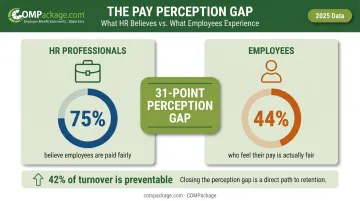
Gallup research estimates replacing an employee costs one-half to two times their annual salary, with 42% of turnover being preventable. Pay and benefits ranked as the most common single reason employees left in 2024.
Separately, WorldatWork research shows 75% of HR professionals believe employees are paid fairly, but only 44% believe employees share that view — a 31-point perception gap that has nothing to do with actual pay levels and everything to do with communication.
The Performance Lever Most Employers Miss
When employees understand what their employer is investing in them beyond salary, their perceived value of the job increases. Nearly 75% of workers say benefits matter as much as or more than salary. Forty percent have declined job offers over inadequate benefits. Yet only 46% of organizations provide total rewards statements.
That's a significant gap between what moves employees and what employers communicate.
Each measure serves a different purpose:
| Measure | Best Used For |
|---|---|
| Base pay benchmarking | Market competitiveness and equity analysis |
| Compensation actually paid | Employee-facing communication and performance conversations |
Bridging the Pay Perception Gap: Practical Steps
Step 1: Audit Every Compensation Component
Start by listing every benefit, contribution, and perk the company provides. Calculate a per-employee dollar value for each line item. Most employers are surprised to find total compensation runs 25–40% above base salary once benefits, taxes, and perks are factored in.
Step 2: Build Individualized Total Compensation Statements
Once you know the full cost, the next step is making it personal. Generic benefits summaries rarely change how employees feel about their pay — they need to see their own numbers.
An effective total compensation statement includes:
- Base salary
- Each benefit line item with its dollar value
- Employer retirement contributions
- Paid time off expressed as a dollar equivalent
- Employer-paid payroll taxes
- Any non-cash perks with estimated values
SHRM recommends providing these statements annually at minimum, and notes that employees often fail to value benefits simply because no one has ever quantified them clearly.
Step 3: Use the Right Tools to Scale the Process
For most HR teams, the obstacle isn't motivation — it's time. Manually building individualized statements for 50, 100, or 500 employees simply isn't feasible without the right software.
COMPackage's Employee LOADER feature addresses this directly. The workflow:
- Select benefit categories from 80+ preprogrammed options
- Generate a pre-formatted Excel spreadsheet
- Populate with employee data (one row per employee)
- Map column headings — a one-time setup step
- Upload and generate reports for the full census
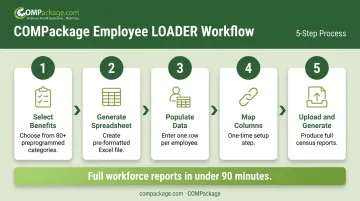
What previously took 5–10 minutes per employee can be completed for an entire workforce in under 90 minutes. COMPackage also supports bulk global defaults for benefits that apply to everyone — holiday bonuses, parking, and similar perks — with manual overrides available for individual exceptions.
Step 4: Integrate Into Performance Conversations
Total compensation statements shouldn't live only in an annual email. Their impact grows when managers incorporate them into:
- Annual performance reviews
- Offer negotiations with candidates
- Onboarding conversations with new hires
- Retention conversations with employees considering leaving
When an employee sees their full package alongside their performance outcomes, the pay-for-performance connection becomes explicit rather than implied.
Frequently Asked Questions
Does compensation mean getting paid?
Compensation is broader than a paycheck. It refers to the total value an employee receives in exchange for their work — including salary, benefits, bonuses, retirement contributions, and non-cash perks. The paycheck is one component, not the whole picture.
Does compensation count as salary?
Salary is one component of compensation, not a synonym for it. Total compensation includes salary plus all employer-provided benefits and contributions, which often add 30% or more to the value beyond base wages alone.
What is a typical compensation package?
A standard package includes base salary, health/dental/vision insurance, a retirement plan with employer match, and paid time off. BLS data shows a typical private-sector employee earning $32.60/hour in wages receives another $14.01/hour in benefits — roughly $29,000 per year in additional employer costs.
What is the difference between base pay and total compensation?
Base pay is fixed cash wages. Total compensation adds the monetary value of all benefits, employer-paid payroll taxes, retirement contributions, and perks on top of that figure. The difference is typically 30% or more.
Why do employees undervalue their total compensation?
Most employees never receive a document showing the full dollar value of their benefits, so they default to salary as their only reference for what they earn. Only 27% of employees fully understand their current benefit options, per WorldatWork research.
How can employers show employees their compensation actually paid?
Total compensation statements are the most effective tool — they itemize every element of an employee's package in dollar terms, personalized to each individual. COMPackage generates these statements for companies of any size, including those with hundreds of employees, without manual data entry for each person.