This guide covers what employee benefits software is, which core features matter, how to evaluate platforms against your organization's actual needs, and why total compensation visibility belongs in every HR team's software strategy.
Key Takeaways
- Benefits software centralizes enrollment, compliance, payroll syncing, and employee self-service into one system.
- The most critical selection factors are ease of use, integration depth, compliance automation, and scalability.
- Employees who undervalue their full compensation package often leave for only slightly higher base pay.
- Small and mid-sized businesses can access full-featured solutions without enterprise budgets.
- COMPackage's total compensation reporting helps HR close the gap between perceived pay and actual employer investment.
What Is Employee Benefits Software?
TechTarget defines benefits administration as "the process of assembling and managing the benefits an organization provides to employees." Benefits software is the digital infrastructure that makes that process manageable at scale — covering enrollment, eligibility, compliance tracking, reporting, and employee communication from a single platform.
Not all benefits software does the same thing. The category includes:
- Full-suite BenAdmin platforms — managing enrollment workflows, carrier data exchange, eligibility rules, and compliance documentation
- Specialized tools — purpose-built for functions like total compensation reporting, so employees see what their package is worth beyond base pay
Many organizations get the most value from using both types together. A BenAdmin platform handles the operational mechanics; a total compensation reporting tool handles the communication gap those platforms typically leave open.
Core Functions of Benefits Software
Enrollment management automates open enrollment windows, new-hire onboarding, and qualifying life event changes. Guided digital workflows replace paper forms and manual tracking, reducing errors and the HR time spent chasing missing signatures.
Compliance tracking monitors eligibility, generates ACA, COBRA, and HIPAA-related documentation, and alerts HR when regulatory changes require action. Given that ERISA reporting failures can draw penalties of up to $2,739 per day, automated compliance support isn't optional for most organizations.
Reporting and analytics surface enrollment rates, plan utilization trends, and total compensation costs — giving HR the data needed to identify inefficiencies and make confident decisions at renewal time.
Key Benefits for HR Teams
The operational case for benefits software centers on three outcomes:
- Reduced administrative burden — Automation cuts manual data entry, error correction, and paper processes so HR can focus on strategic work
- Better employee experience — Self-service portals give employees direct access to benefits information without waiting on HR
- Higher satisfaction through transparency — When employees understand their full package, engagement and retention improve
Digital adoption is already changing how employers communicate. According to a survey by Assurex Global, reliance on paper enrollment fell 14% in a single year, and 73% of employers now use websites, apps, or video for benefits communication.
Transparency is where most HR teams still leave value on the table. According to MetLife's 2023 Employee Benefit Trends Study, 76% of workers who understood their benefits reported being happy at work, compared to just 47% of those who didn't. Eighty-two percent said that understanding gave them a greater sense of stability, versus 52% among those who lacked it.
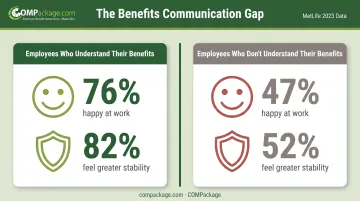
The satisfaction gap is almost entirely a communication problem. Benefits software that includes total compensation reporting closes it.
What to Consider When Choosing Benefits Software
Choosing the wrong platform creates real downstream costs: manual workarounds, payroll discrepancies, poor employee adoption, and compliance exposure. A structured evaluation before you commit to a vendor is worth the time it takes.
The right solution depends on your company size, workforce complexity, existing tech stack, and HR goals. Weigh each of the following factors against your specific priorities, not a generic checklist.
Ease of Use and Employee Self-Service
If employees can't navigate the platform to enroll, view their coverage, or access benefit details, adoption stays low and HR spends more time on support requests than on anything strategic. Intuitive design isn't a nice-to-have.
During vendor demos, evaluate both the admin dashboard and the employee-facing portal separately. Ask for a test account and time how long it takes an employee to complete a basic task: enrolling in a plan, changing a dependent, or pulling a benefits summary.
If it takes more than a few minutes without guidance, that friction will compound across your entire workforce during open enrollment.
Payroll and HRIS Integration Depth
Bidirectional, real-time integration between your benefits platform and payroll/HRIS systems is what prevents data discrepancies from becoming payroll errors. Without it, benefit elections don't automatically flow through to deductions, and someone has to reconcile the difference manually.
When evaluating vendors, ask specifically:
- Is the integration real-time or batch-based?
- Which payroll and HRIS platforms are natively supported?
- What happens when an employee's eligibility status changes mid-year?
The answers reveal whether you're looking at a genuine integration or a CSV export dressed up as one.
Compliance Automation and Regulatory Support
Benefits compliance touches ACA, COBRA, HIPAA, ERISA, and a growing set of state-specific mandates. HIPAA administrative violations alone can range from $145 to over $2.1 million per calendar year depending on severity and whether the issue was corrected.
Tracking these requirements manually creates meaningful legal and financial risk, especially for smaller HR teams without dedicated compliance staff.
The best platforms automate eligibility tracking, generate required notices, maintain audit trails, and update automatically when regulations change. Ask vendors directly: how are compliance updates handled, and do they require manual configuration on your end?
Scalability and Flexibility
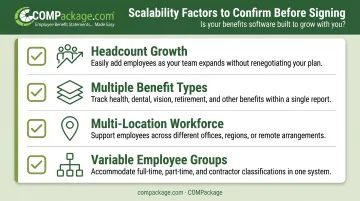
A platform that works well at 50 employees can become a serious bottleneck at 200 or 500. Before signing anything, confirm whether the software can handle:
- Headcount growth without a full platform change
- Multiple benefit types and plan configurations
- Multi-location or remote workforce complexity
- Different benefit structures for different employee groups (full-time, part-time, contractors)
Flexibility also means being able to adjust benefit offerings without filing a support ticket for every change. If configuration requires vendor involvement for routine updates, that dependency will cost you time at the worst possible moments.
Total Compensation Visibility and Reporting
This is the most consistently overlooked feature in the evaluation process. Total compensation reporting (the ability to show each employee what their full package is worth, including health coverage, retirement contributions, PTO, and employer-paid perks) directly affects retention and satisfaction.
According to the Bureau of Labor Statistics, benefits represent 30.1% of total employer compensation for U.S. private-industry workers, averaging $14.01 per hour. Most employees only see their base salary on their pay stub.
That gap between what employers invest and what employees perceive drives unnecessary turnover. Employees leave for marginally higher base salaries without realizing what they're actually giving up.
Look for platforms that generate personalized total compensation statements, or plan to add a dedicated tool like COMPackage alongside your core benefits system.
Pricing and Support Quality
Benefits software pricing varies significantly, from per-employee-per-month models to flat-fee or modular structures. The true cost of ownership includes implementation fees, support tiers, training, and the cost of upgrades. Get a full breakdown before signing, not just the headline rate.
Customer support quality during and after implementation is one of the strongest predictors of long-term success. Ask vendors about:
- Response time commitments during normal and peak periods
- Whether dedicated account management is included
- What support looks like during open enrollment, when you need it most
How COMPackage Helps HR Teams Show Employees Their True Value
COMPackage is the world's first self-service total compensation report solution, built to close the perception gap that full-suite benefits platforms often leave open. It does not manage enrollment or compliance workflows. Instead, it focuses on one outcome: every employee understands the full monetary value of what they receive.
What COMPackage Generates
Each report goes well beyond base salary. It can include:
- Health insurance, retirement contributions, and PTO
- Government-mandated benefits
- 80+ additional perks such as company phones, parking, holiday bonuses, and staff lunches
- Non-quantifiable benefits like flexible work arrangements
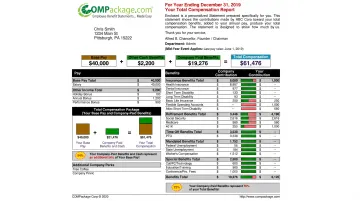
If a category has no value for a specific employee, it simply does not appear on their statement. Reports stay clean and relevant.
Reports are fully branded with company logos and colors, built through a self-service, menu-driven process that typically takes about six minutes per employee when entered manually.
Built for Speed and Scale
For HR teams processing reports across an entire workforce, the Employee LOADER accepts bulk data from Excel files with one employee per line. Once column headings are mapped to COMPackage fields, importing 100 or even 1,000 employees takes minutes, not days. Twelve auto-calculators handle government-mandated benefits, insurance, time-off, and retirement contributions automatically, which cuts manual entry significantly.
A typical first-time user can go from purchase to completed report in approximately 20 minutes. There is no installation or IT dependency, and no multi-week implementation timeline.
Pricing and Accessibility
COMPackage is designed to be accessible at any company size. Annual pricing runs:
| Employee Count | Annual Price |
|---|---|
| 1–5 employees | $149/year |
| 1–15 employees | $299/year |
| 16–25 employees | $399/year |
| 26–50 employees | $699/year |
| 51–100 employees | $999–$1,199/year |
| 101–200 employees | $1,699–$2,099/year |
| Unlimited | $2,599/year |
Multi-year terms offer discounts of up to 40%. All packages include a 30-day money-back guarantee and product updates throughout the year at no charge.
For HR consultants, benefits consultants, and insurance agencies managing multiple clients, the Professional version ($2,999/year) provides unlimited reports across unlimited clients, client sublicensing, multi-language and multi-currency templates, and client-specific folder organization.
Who Uses It
COMPackage is trusted by organizations ranging from small businesses to recognized brands, including Coca-Cola, Harley-Davidson, Tito's Handmade Vodka, and the Frank Lloyd Wright Foundation. Regional users include Westfield Bank and the Better Business Bureau of Boston.
Housewright Construction has used the platform for over six years to improve wage and benefit transparency with their workforce.
Conclusion
The right benefits software matches your organization's size, compliance requirements, workforce complexity, and employee communication goals. Use the selection factors in this guide to build a structured evaluation process before committing to any vendor.
Software selection also isn't a one-time decision. As your workforce grows and benefit programs evolve, your tools need to keep pace. Adding a specialized solution like COMPackage to an existing benefits tech stack can improve retention without a full system overhaul. Showing employees what they're truly earning costs far less than replacing them when they leave.
Frequently Asked Questions
What are employee benefits administration (BenAdmin) platforms?
BenAdmin platforms are digital systems that centralize benefits enrollment, eligibility management, compliance tracking, and carrier data exchange. They allow HR teams to manage benefits programs from a single interface rather than across disconnected spreadsheets and manual processes.
What does EBS mean in employee benefits?
EBS stands for Employee Benefits Software (or Employee Benefits System), a broad term for technology solutions that automate and manage employee benefit programs, including health insurance, retirement plans, voluntary benefits, and compliance reporting.
How does benefits administration software help with compliance?
Benefits software automates eligibility tracking, generates ACA and COBRA notices, and keeps audit-ready records. That lowers the risk of fines from manual gaps across ERISA, HIPAA, and state mandates.
Can small businesses afford employee benefits software?
Yes. Many tools use per-employee pricing, cloud hosting, and self-service setup so smaller teams avoid heavy IT costs. For total compensation reporting specifically, COMPackage starts at $149 per year for up to five employees, so you can produce professional statements without an enterprise budget.
What is the difference between benefits administration software and total compensation reporting tools?
Benefits administration software manages enrollment, eligibility, and compliance workflows. Total compensation reporting tools like COMPackage generate personalized statements showing each employee the full monetary value of their compensation package, including benefits, retirement contributions, and paid leave. Those statements support retention by making the full package visible.
How can showing employees their total compensation reduce turnover?
Employees who only see base salary on a pay stub often undervalue what their employer invests in them. Clear total compensation statements quantify benefits and perks, raise satisfaction with current pay, and make a slightly higher base offer elsewhere less tempting.