Pick the wrong platform now and you're looking at a painful migration in 18 months. Pick one that's already obsolete for your size, and your HR team spends their days on manual workarounds instead of actual HR work.
This guide cuts through the noise with a curated list of the best HR software for companies near the 200-employee mark — what each tool does well, where it falls short, and how to make a smart decision for where your company is headed.
Key Takeaways
- At ~200 employees, you need mid-market HR software — scalable enough to grow with you, simple enough that a lean HR team can use it
- BambooHR, Rippling, Paycor, and ADP Workforce Now are the strongest contenders at this headcount
- Expect to pay roughly $8–$25 per employee per month for core HR features; some vendors require a custom quote
- Most HR platforms skip compensation visibility; a tool like COMPackage fills that gap directly
- Pay transparency decreases intent to quit by 30%, making compensation visibility a legitimate retention lever, not just a nice-to-have
What Makes HR Software Different for ~200-Person Companies
A 20-person startup can get by with a basic payroll tool and a shared Google Drive. A 2,000-person enterprise has a dedicated HR team, an IT department, and budget for a full HCM suite. Companies sitting at 200 employees are in neither camp, which creates a distinct set of software requirements that most platforms don't explicitly address.
The Compliance Reality at This Size
By the time you reach 200 employees, most of the major federal compliance thresholds have already activated:
- 50+ employees: ACA applicable large employer status kicks in, requiring Forms 1094-C and 1095-C; FMLA coverage also begins
- 100+ employees: EEO-1 reporting is required; WARN Act obligations apply for covered layoffs
- 100–249 employees: OSHA electronic injury reporting requirements apply in designated industries
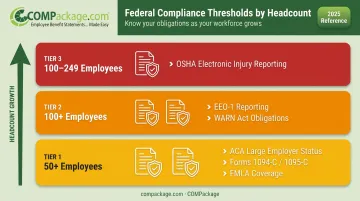
These aren't optional. A 200-person company that hasn't automated compliance tracking is one audit away from a significant problem.
The HR Staffing Math
SHRM's 2025 CHRO benchmarking data reports a median of 1.98 HR staff per 100 employees. That means a 200-person company typically has 3–4 HR professionals handling everything from hiring to benefits to payroll to performance reviews. Without strong automation, that team is perpetually underwater.
The platforms below were selected for the 150–500 employee range based on three criteria: compliance automation depth, self-service capabilities that reduce HR ticket volume, and pricing that doesn't assume enterprise-level budgets.
Best HR Software for Companies with 200 Employees
Selection criteria: feature depth for mid-market HR needs, scalable pricing as headcount grows, realistic implementation timeline for lean HR teams, and customer support quality.
BambooHR
BambooHR has earned its reputation as the go-to HRIS for small and mid-sized businesses. Its clean interface and employee self-service tools make it one of the easiest platforms to roll out without a dedicated IT team.
For a 200-employee company, the biggest advantage is how little training it requires. HR staff can configure it quickly, employees can manage their own data through the mobile app, and onboarding workflows run automatically.
| Category | Details |
|---|---|
| Key Features | Employee self-service, ATS, time-off management, performance reviews, onboarding workflows, mobile app, e-signatures, benefits enrollment |
| Pricing | Published PEPM rates: Core $10, Pro $17, Elite $25; volume discounts apply; add-ons (payroll, time tracking) priced separately |
| Best For | Companies prioritizing ease of adoption and an intuitive all-in-one HRIS without enterprise complexity |
Watch for: Add-on costs can escalate quickly if you need payroll processing and advanced time tracking. Custom reporting has some limitations noted by mid-market users.
Rippling
Rippling combines HR and IT in one platform. When a new employee joins, it can provision their laptop, set up software access, and complete HR onboarding in a single automated workflow.
For tech-forward companies at the 200-employee mark, this unified approach eliminates the friction between HR and IT that usually generates support tickets and manual coordination.
| Category | Details |
|---|---|
| Key Features | HR + IT + payroll in one platform, workflow automation, global payroll support, 600+ out-of-the-box integrations |
| Pricing | Modular pricing; Forbes Advisor lists a starting price of $8/user/month; costs rise with each added module; custom quote required for full configuration |
| Best For | Tech-forward companies that want to unify HR and IT operations in a single automated system |
Watch for: The modular model means costs can compound as you add capabilities. Reporting flexibility and support response times get mixed reviews for complex edge cases.
Paycor
Paycor targets the 50–1,000 employee segment directly, which means its feature set reflects the actual complexity companies face at 200 people — multiple pay structures, benefit plan variations, performance cycles, and compliance tracking across departments.
Its payroll engine is particularly strong, and the customizable performance management workflows give HR teams more control than most platforms at this price point.
| Category | Details |
|---|---|
| Key Features | Payroll processing, benefits administration, time tracking, talent acquisition, talent management, performance reviews, compliance tools |
| Pricing | Custom/quote-based for 50–1,000+ employees; no published PEPM rates for mid-market; contact Paycor for current pricing |
| Best For | Companies prioritizing payroll accuracy and compliance with a need for integrated talent management |
Watch for: Pricing isn't publicly listed for mid-market tiers, so budget planning requires a direct conversation with their sales team before you can compare costs.
ADP Workforce Now
ADP Workforce Now is what you choose when compliance is non-negotiable. Decades of payroll infrastructure, multi-state processing support, and deep ACA tracking make it the most proven option on this list.
The trade-off is a less modern interface and a steeper learning curve than newer platforms. If you're managing complex payroll across multiple states, a 70-year track record and purpose-built compliance infrastructure carry real weight.
| Category | Details |
|---|---|
| Key Features | Full-suite payroll, benefits administration, time and attendance, HR analytics, compliance management, ACA reporting, 200+ integrations |
| Pricing | Custom/quote-based; Capterra lists $10/user/month as a starting reference point; actual cost depends on modules and headcount |
| Best For | Companies prioritizing payroll reliability, multi-state compliance, and a full-featured HR suite with an established vendor |
Watch for: Implementation complexity and UI friction are the most common complaints in user reviews. Build extra onboarding time into your project plan.
COMPackage
COMPackage sits in a different category from the four platforms above. It's a self-service total compensation reporting tool that shows employees what they're actually earning — beyond the number on their paycheck — and it pairs with whatever HRIS you already use.
The compensation perception gap is real at 200 employees. EBRI's 2025 Workplace Wellness Survey found that workers estimated their benefits at 16% of total compensation when the actual figure was closer to 30%.
Employees who don't see the full value of their package are more likely to leave for a competitor offering a marginally higher salary — even when their total compensation is already competitive.
COMPackage closes that gap by generating detailed, customizable total compensation statements covering salary, health insurance, retirement contributions, paid time off, and over 80 benefit categories. Reports are processed in-house, without outsourcing to a service provider.
| Category | Details |
|---|---|
| Key Features | Self-service total compensation reports, bulk employee data import via Employee LOADER, 80+ benefit categories, 12 auto calculators, customizable branding, non-quantifiable benefits display |
| Pricing | Tiered annual licensing by employee count; visit compackage.com for current pricing; 30-day satisfaction guarantee; no installation required |
| Best For | Companies using any HRIS that want to reduce turnover by showing employees the true value of their total compensation |
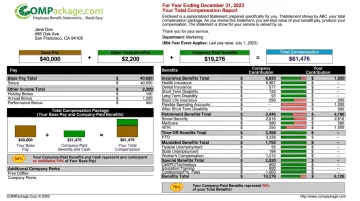
Unlike the other platforms on this list, COMPackage pairs with your existing HR stack rather than replacing any part of it — which is why it belongs in the conversation regardless of which HRIS you choose.
How We Chose the Best HR Software for 200-Employee Companies
The most common mistake companies make at this headcount is choosing software based on what worked at 50 employees — or picking a brand name without checking whether it actually fits mid-market operational requirements. Name recognition doesn't substitute for the right feature set.
Evaluation Criteria
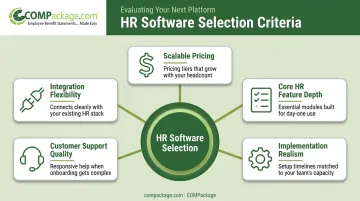
Each platform was assessed against five factors:
- Scalable pricing — does the cost model work at 200 employees and remain viable at 350?
- Core HR feature depth — payroll, benefits, compliance, onboarding, and time tracking
- Implementation realism — can a 3-person HR team configure and run this without outside consultants?
- Customer support quality — responsiveness when things go wrong, not just during the sales process
- Integration flexibility — does it connect to the payroll, benefits, or business tools you already use?
Why Retention Was Weighted Heavily
Compensation management and employee retention features were treated as evaluation criteria, not afterthoughts. Replacing an employee costs between 50% and 200% of their annual salary, according to SHRM — a number that adds up fast at 200 people with even modest turnover.
Tools that help employees understand the full value of their compensation package directly address one of the most preventable causes of voluntary turnover. COMPackage made this list specifically because it gives employees a clear, itemized view of total compensation — base pay, benefits, and perks combined — which research consistently ties to improved retention outcomes.
Conclusion
For companies at the 200-employee mark, the right HR software is the one you won't have to replace when you hit 300 or 400 people. That means choosing on near-future needs, not just current price.
Before signing anything, evaluate each platform on three criteria:
- How the pricing model scales as headcount grows
- What implementation support is included — and what it actually costs
- Whether it integrates cleanly with your existing payroll and benefits infrastructure
Whichever HRIS you choose, consider pairing it with COMPackage to close the compensation visibility gap. It's an affordable add-on that helps employees understand the full value of their compensation — something most HRIS platforms don't address on their own. Visit compackage.com to see current pricing and explore a sample report.
Frequently Asked Questions
What is the best HR software for a company with about 200 employees?
There's no single best option — it depends on your priorities. BambooHR leads on ease of use, Rippling excels at HR/IT integration, Paycor is strongest for payroll and talent management, and ADP Workforce Now is the top choice for compliance-heavy or multi-state operations. Most companies at this size do well evaluating all four before committing.
What software do HR professionals use?
HR teams commonly use BambooHR, Rippling, ADP Workforce Now, Paycor, Workday, and Gusto as core HRIS platforms. Many also layer in specialized tools for compensation reporting, performance management, or recruiting alongside their primary system. COMPackage, for instance, handles total compensation visibility as a complement to any core HRIS.
What features should HR software have for a 200-person company?
At this headcount, must-have features include:
- Payroll processing and tax filing
- Benefits administration
- Compliance tools (ACA, EEO-1, FMLA tracking)
- Employee self-service portal
- Onboarding workflows
- Time and attendance tracking
- Performance management and reporting
How much does HR software cost for a 200-employee company?
Core mid-market HR platforms typically run $8–$25 per employee per month, though costs vary significantly by vendor, tier, and add-on modules. BambooHR publishes rates of $10–$25 PEPM; Rippling starts around $8/user; Paycor and ADP Workforce Now require custom quotes for mid-market buyers.
What is the difference between HRIS, HRMS, and HCM?
HRIS focuses on employee data storage and basic HR functions like payroll and attendance. HRMS expanded on HRIS to include process automation and broader HR workflows. HCM treats the workforce as a strategic asset and adds workforce planning, talent development, and engagement capabilities. Most modern platforms include elements of all three regardless of how they label themselves.
How do you know when it's time to upgrade your HR software?
Key signals: your HR team spends significant hours on manual data entry or workarounds, payroll errors are occurring regularly, you can't generate compliance reports automatically, or your current tool lacks features your headcount now requires. If any of these sound familiar at 150–200 employees, the upgrade conversation is overdue.